
Complete Guide To Setting Up A 2000s Music Machine
Last updated 25/4/25
Hello!
Do you want to go on a mad side quest and potentially waste all of £20 and many weeks of your life to find the glorious nirvana of music that sounds like the magic of the 2000s?
Recently I have been using old software from the 2000s to make music. I have been making music for over 20 years and have been through the full evolution of the Digital Audio Workstations. At some point, when Logic went from being multi-platform to being a Mac-only software package, I noticed a distinct change in the sound of the music I was making and I was not happy — but I ignored it, thinking that it must be better because it is new.
I had a baby son and in this time I had no way to get into the studio to work on music. I still have not joined the world of M1 through M4 chips on Macs as I just can't justify the cost, and I had an old PC laptop laying around, so I decided I would try my hand at using old software and try to make music like it used to be made. After 16 weeks I could not go back.
Yes, the workflow is a complete nightmare and there is loads of setup of keyboard shortcuts and screen sets and finding the right plugins — some work, some do not and some are complete shit — but there are diamonds in the rough. I will go through what I have learned so you can have a head start on making your own 2000s machine.
Laptops
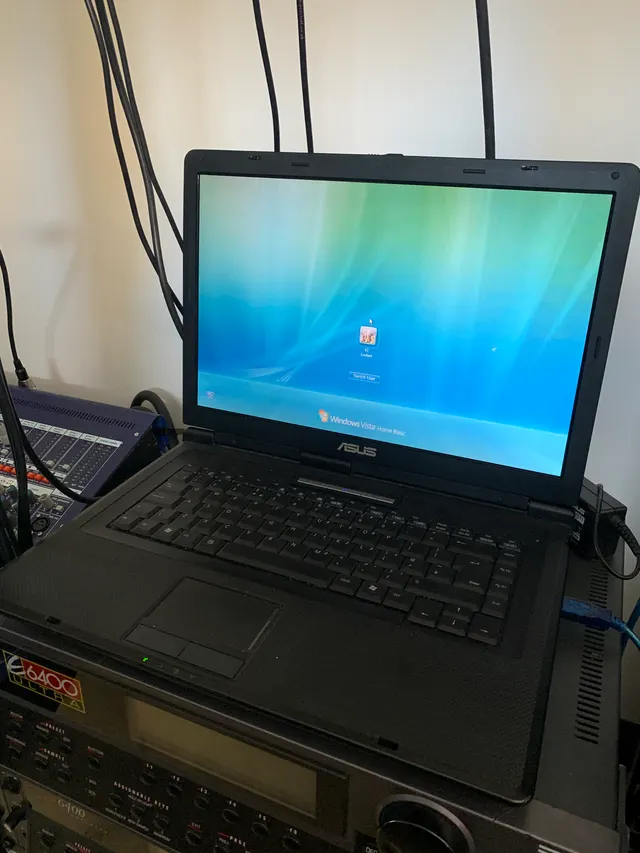
I started off on a really crappy laptop worth £10 nowadays, which I still have in a hardware-only setup.
I have now moved on to a workstation laptop: the HP Elitebook 8740W! This is a laptop which is a complete brick, very heavy and not really portable, but very very powerful for the time. It is, according to many sources, the most powerful laptop you could buy in 2012 — originally £5000, now £85 :)
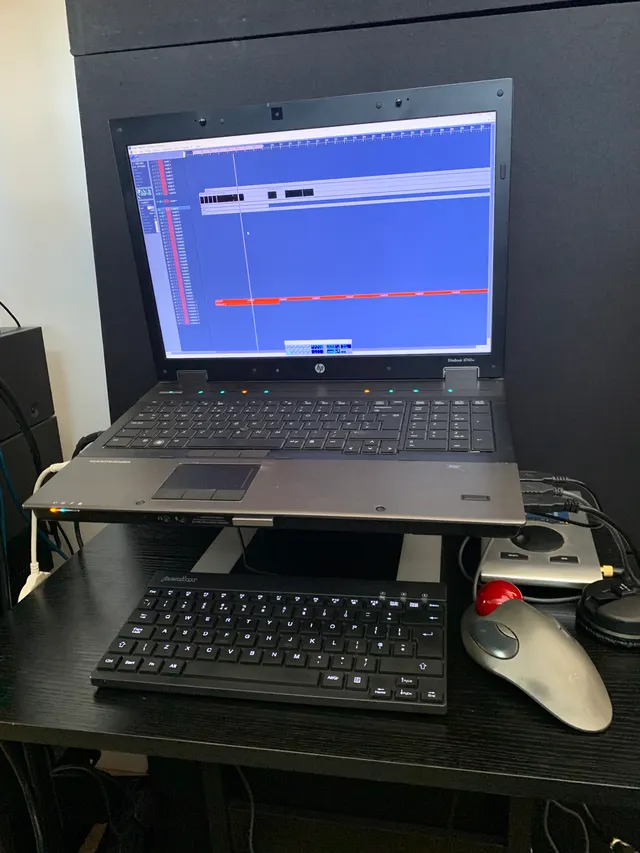
For the technical minded, it is very well worth cleaning the shit out of the new laptop and then taking the whole thing apart and re-applying the thermal paste on both the CPU and GPU, and also getting it maxed out in terms of RAM and hard drive. I have found these 1TB SSDs on Amazon for £50. It's well worth getting a brand name SSD, as you need to not be losing your work due to a hard drive malfunction.
In terms of the choice of computer there are so many options out there, and I recommend doing some deep research on the right one for you. I wanted the most power available in the 2000s.
Operating Systems
I now use Windows 10. I was on Windows Vista. Logic 5.5 would not however work on Vista, so I had to use Logic 5.3 on that system, but on Windows 10 I use Logic 5.5 and it runs very well indeed.
After having been a Mac user for many years, going back to the PC was a very interesting experience. PCs are actually good now. Windows has many good features out of the box that I was surprised to find, like a window manager and other system-wide keyboard shortcuts that make so much sense I ported them over to my Mac system.
There are many tutorials on how to install an operating system on the PC, so I won't cover everything here, but one thing I will say is: if you get stuck for a serial, search Windows Activation Scripts and it will take you to a GitHub and you can get it running very quick, in true hacky making-music-on-old-software-with-unsupported-software fashion.
Operating Systems — updated Aug 2026
So it appears that there is a bug with Windows 10 when it comes to Logic 5.5.1. I did not really notice it when I was working, until a couple of times now the whole program goes down to what feels like 5fps on the refresh rate of everything that is displayed. This can not be fixed with a reinstall of Logic. The only thing that fixes the issue is a complete OS reinstall. After the second time I have now started looking for alternative options.
I was given a laptop — a Thinkpad T410 to be exact — with 32-bit / x86 Win XP. So far Logic seems to like this OS very much, to the point where some VSTs that would not work on Win 10 are now working as VSTs and not just the DirectX versions. This is a very positive step in the right direction for me, given I have been making all my music on this system for the last 2 years now.
Software I am Using
There is so much legacy software out there for the old platforms. I have been down every rabbit hole so you don't have to — but you can if you like, cause it's just the best thing ever. There are so many synths and plugins to try out from small companies that don't exist any more. It has been really interesting going in and learning about all the people involved in the plugins, and I will try to elaborate as much as I can about the journey I have taken.
DAW: E-Magic Logic 5.5
My main DAW of choice is E-Magic Logic 5.5 at this point. I have tried to use Steinberg Nuendo 2.0 and it is really good and interesting, but the sound of Logic in this era is unmatched. I find myself reaching for plugins that only Logic has.
Keyboard shortcuts: I have extensively changed all the keyboard shortcuts to make the main functions that I use be on primary keys. For some reason whoever designed the default set did not set any of the functions you would be using all the time as primary keys, and buried them in modifiers like Shift and Ctrl. Very strange, so I spent a couple of nights setting up the DAW as I like it. When it came to migrating over to a new machine it appears you can't export your key commands, so it was another half day setting up the shortcuts again — the joys of old software.
Screen sets: In Logic you can set up a bunch of screen sets on numbers 1–9. Instead of having to open and close windows, you just set up a bunch of views and switch between them. This is really handy when it comes to workflow and I use it constantly.
No offline bounce: In Logic 5.5 there is no offline bounce at all. This means you have to listen to the whole tune when you bounce out the audio. This is all part of the charm. There are no shortcuts when it comes to this old music making, and this is one of the quirks of being old school. A lot of times I get to the second drop or whatever and I'm like nah, that bit is not right, and I end up stopping it and fixing it. I think it is good to hear your tunes in the context of a run-through listening experience. It definitely drives perfection.
Plugins
Kontakt 2 — For sampling I have been using Kontakt 2. It really is fantastic, with all the layering options and looping options and FX built in. Once you get the hang of it I think it's one of the most powerful samplers out there. With some neat tricks you can make it sound like an old sampler, like when you use the lo-fi FX and set them to 12 bit and 30kHz sample rate — you get that Roland S760 vibe straight out of the box. Since using it, though, I have found a plugin that is free called Time Machine that does it way better. Search for Tone Boosters Time Machine Free. It comes in many flavours: 32/64-bit, Win/Mac. Well worth checking out for some DAC/ADC emulation.
Massive V1.12.006 — The main synth of choice for that 2000s sound as far as I am concerned. Quite the powerhouse. I have a website where I sell presets, and over the course of a year I made 1000 Massive Presets you can buy now, so I have a lot of experience with this synth. There is so much in there to explore and I never get bored of making new sounds on it.
Massive bug! If Massive starts to crash, navigate to C:\Users\"username"\AppData\Local\Native Instruments\Massive and delete the database, and Massive will work again :) Also don't rely on the external sync as it is buggy — better to set the BPM of sounds within the synth itself. Everything will be much tighter.
Z3ta+ — With the worst interface ever! But OK when you get to know it, Z3ta is the jump up bass machine you never knew you needed. There is so much in there, but it has its quirks. It was developed by a DSP engineer from Venezuela called René G. Ceballos. What a legend! I wish the wave shaping was able to be modulated — that's my one gripe. Other than that it is a beast! Mainly I make bass sounds and then record them out and resample them.
Audio editor: Sound Forge 5.0
I have used Sound Forge for so long. It really is the best audio editor in my humble opinion. The original versions are so lean and quick and feel very utilitarian — I feel like I am working at the BBC or some shit when I am using it. I use it for chopping up samples, and for listening sessions when I have all my tunes open and flick between them to make notes on what needs doing to each one.
History Of Logic
History of Logic (DAW) — from inception to today, and why version 7 changed so much.
Origins: C-Lab Notator / Creator (late 1980s – early 1990s)
- C-Lab (later Emagic) was a German company making MIDI sequencing software for the Atari ST — namely Creator and Notator.
- These were some of the earliest DAW-like environments, designed to be used with external hardware synths and samplers via MIDI.
- Key features: graphical piano roll and score editors, real-time MIDI effects, and the Atari's built-in MIDI ports gave it a huge edge in timing.
Emagic Logic: versions 1 to 4 (1993–1999)
- In 1993, C-Lab became Emagic, and "Notator Logic" was born for Mac and PC.
- Built to be modular, with a plugin architecture (Environment), integrated score, audio and MIDI editing.
- Logic 2–4 added audio support (Logic Audio), VST plugin support and 32-bit internal processing.
Logic 5–6 (2001–2002)
- Logic 5 brought Windows support, the AU (Audio Units) format, the EXS24 sampler, surround, a 32-channel mixer and deep automation.
- Logic 6 added freeze tracks and improved automation and audio engine stability.
Apple buys Emagic (2002)
- Apple acquired Emagic in July 2002.
- Windows support was dropped abruptly.
- Logic became Mac-only from version 6.4 onward.
- The beginning of integration with Core Audio and macOS.
Logic 7 (2004): deep architectural changes
- Core Audio integration deepened — Emagic's internal engine was replaced with CoreAudio-optimised systems, with tighter latency and CPU handling.
- New plug-in delay compensation (PDC) — full PDC across tracks and busses, which required internal audio buffer restructuring.
- New instruments and effects — the Sculpture physical modelling synth and an enhanced Space Designer reverb.
- GarageBand integration — import GarageBand sessions and Apple Loops.
Why the audio engine changed
- Unified with the macOS ecosystem.
- Optimisation for AltiVec, G4/G5 processors.
- The rewritten engine changed summing engine behaviour, timing accuracy and plugin latency management.
- These changes affected transient feel, stereo imaging and clarity.
Can we just appreciate the last line there... changes affected transient feel, stereo imaging and clarity. I thought I was going mad when I thought the sound changed! But it's a thing.
Where Can I Find Software?
Ethics and dangers of warez: Yes, it is not ethical to use warez. If you feel bad like me, buy the latest versions of the software and then run the warez on the old machine. All the software I use I own legitimately in its latest form for my current machine, and on my legacy machine I use the warez because the companies just simply do not support the old systems.
Where to find all the software you could ever need:
I can't sing the praises of archive.org more. There is so much stuff on there, and getting creative with your search terms can yield very interesting results.
Sound Cards
Why do I need a sound card? Because ASIO... ASIO is a driver for most of the software you are going to encounter on old systems, and in Logic, for instance, it is required to even load plugins — and it will only work with an external sound card. USB sound cards seem to be the most reliable as far as I can tell, and it's a bit of a minefield looking for one that will be compatible with your system. But as with all things legacy, you have to hack your way through it. But we like the pain of making music or we would not even be reading this, right?!
So I had an old RME Babyface Pro knocking around here, and the thing is built like a tank. I dropped it from about 5 foot onto a hard wooden floor and not a scratch — but that's by the by. It has been rock solid.
God bless RME! I have not met an operating system that my RME cards don't work on. Even Linux, just about. For this reason I can't recommend them more. The drivers are rock solid and just everything about RME feels well balanced and thought through.
There are other sound cards from the era that might also work with an old system. I think, though, that to get better than RME I would be looking at a Lynx or Prism, and they are so good they hold value — and let's face it, we are doing this on the cheap :)
Disclaimer
Any information on this page is for research purposes only. I accept no responsibility for any of your problems :) Be that hearing loss, or data loss due to the cornucopia of viruses and malicious software trojaned into old warez. To be safe, just air-gap the music PC.
I also take no responsibility for the massive success you will discover when people hear the mad music you make on your old system, and how much you hate going back to the new software and how it sounds. It really is a thing.
Topics To Cover / Remarks
As with everything on this website, this is a fluid document which will change and be updated whenever I feel in a writey mood. In this section I will keep note of topics to cover.
- List of the best laptops that would be compatible with old software
- Logic Pro foibles — double-click editor / sound card setup / screen sets / audio window / no offline bounce / no bounce in place
- Plugins: the free ones — links
- My wish list: a sampler — 32-bit, legato, all the regular sampler features, AD converter emulation, no anti-aliasing
If you have any changes, suggestions or anything else you need to tell me, please send a friendly email to dontplayrecords@gmail.com.
The above email is also a PayPal address if you are feeling spenny and wanna help me to continue to spread info on things that inspire me.